New · 360º Virtual AI Office

YOUR BUSINESS –
VISIBLY
AT WORK.

A 3D office inside your admin panel: AI employees handle tickets, orders, social media and reports – with your real data. Your team works in the same office, and meetings happen in the meeting room. You see every step and approve with one click.

Request a demo How it works
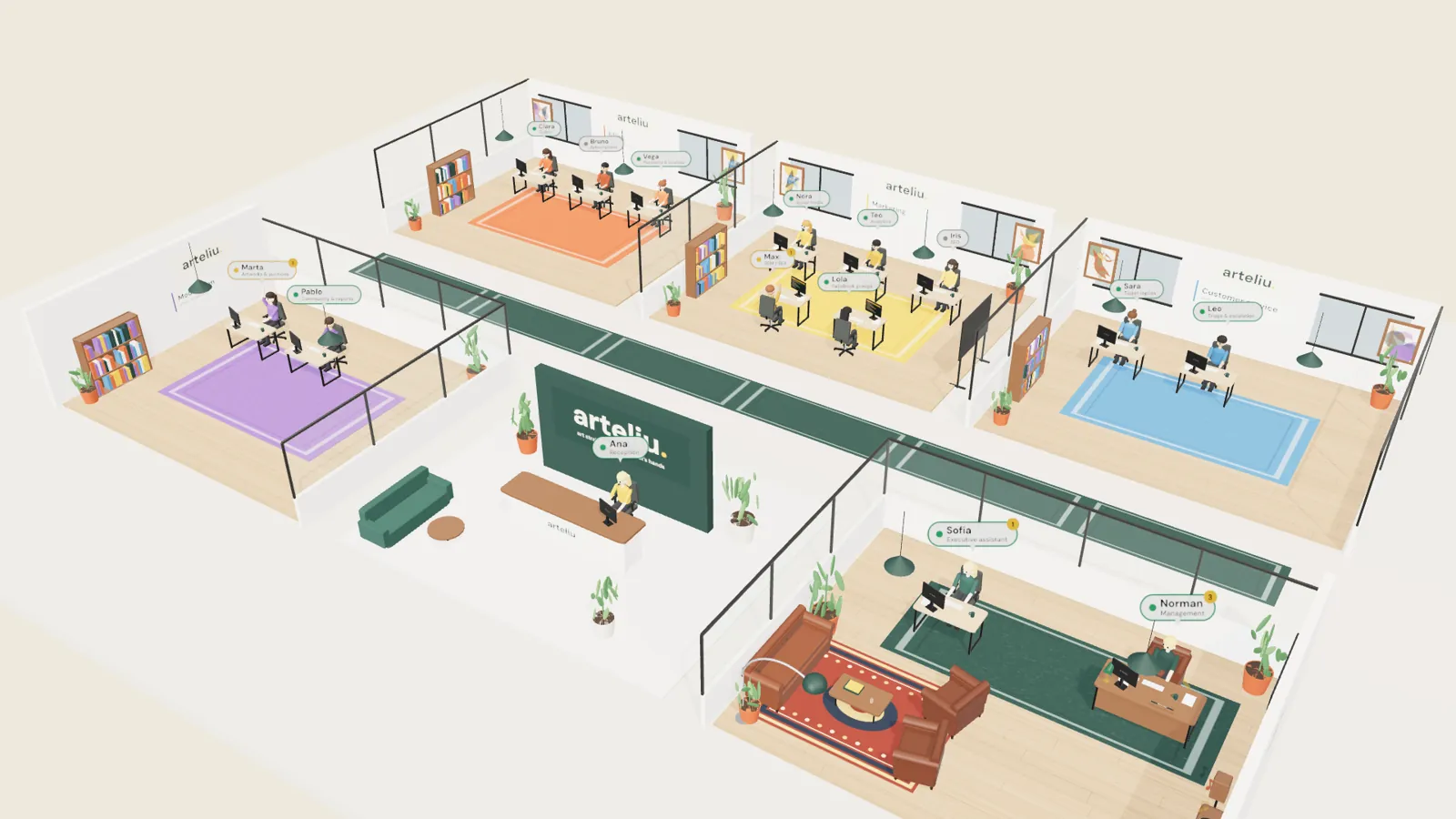
Arteliu's 3D virtual office: reception, accounting, marketing, customer service, moderation and management with AI employees at their desks
Real case: the Arteliu office

ROUTINE EATS YOUR DAY.

Answering tickets, checking orders, writing posts, moderating content, putting together reports – the same tasks every day. And barely any time is left for what really moves your business forward.

  • Support tickets
  • Orders
  • Social media
  • Moderation
  • Reports

360º Virtual hands this work to AI employees – and you stay in control at all times.

FROM INBOX TO APPROVAL

Every task follows the same clear path – and you watch it live in the 3D office.

01
Reception spots everything
Tickets, orders, new posts, reports, failed payments: Ana at reception passes them straight to the right department.
02
The department works with AI
AI employees handle the case with your real data – order, customer, product, payment.
03
The assistant pulls it together
Sofía collects the results from every department and presents them to you, neatly organised.
04
You approve
Read, adjust if needed, approve with one click. Only then does anything go out.
How 360º Virtual works · 27 s

EVERY DEPARTMENT A ROOM. EVERY DESK TAKEN.

Example from the real Arteliu case – we plan departments and employees to fit your business.

Accounting
Unshipped orders, subscriptions and failed payments under control – plus a daily summary of revenue.
Marketing
Posts for Facebook and Instagram, weekly analytics, SEO for product pages, Google Ads campaign proposals and copy for Facebook groups.
Customer service
Sorts tickets by topic and priority, drafts the reply with the real order data and escalates the tricky ones.
Moderation
Reviews new posts with their photo and suggests: approve, request changes or remove. Keeps an eye on the community and reports.
Reception · Ana
Spots everything that comes in – tickets, orders, new posts, reports, failed payments – and passes it on right away.
Management · Sofía
Your assistant hands out tasks, collects the results and writes the sales report and daily summary.
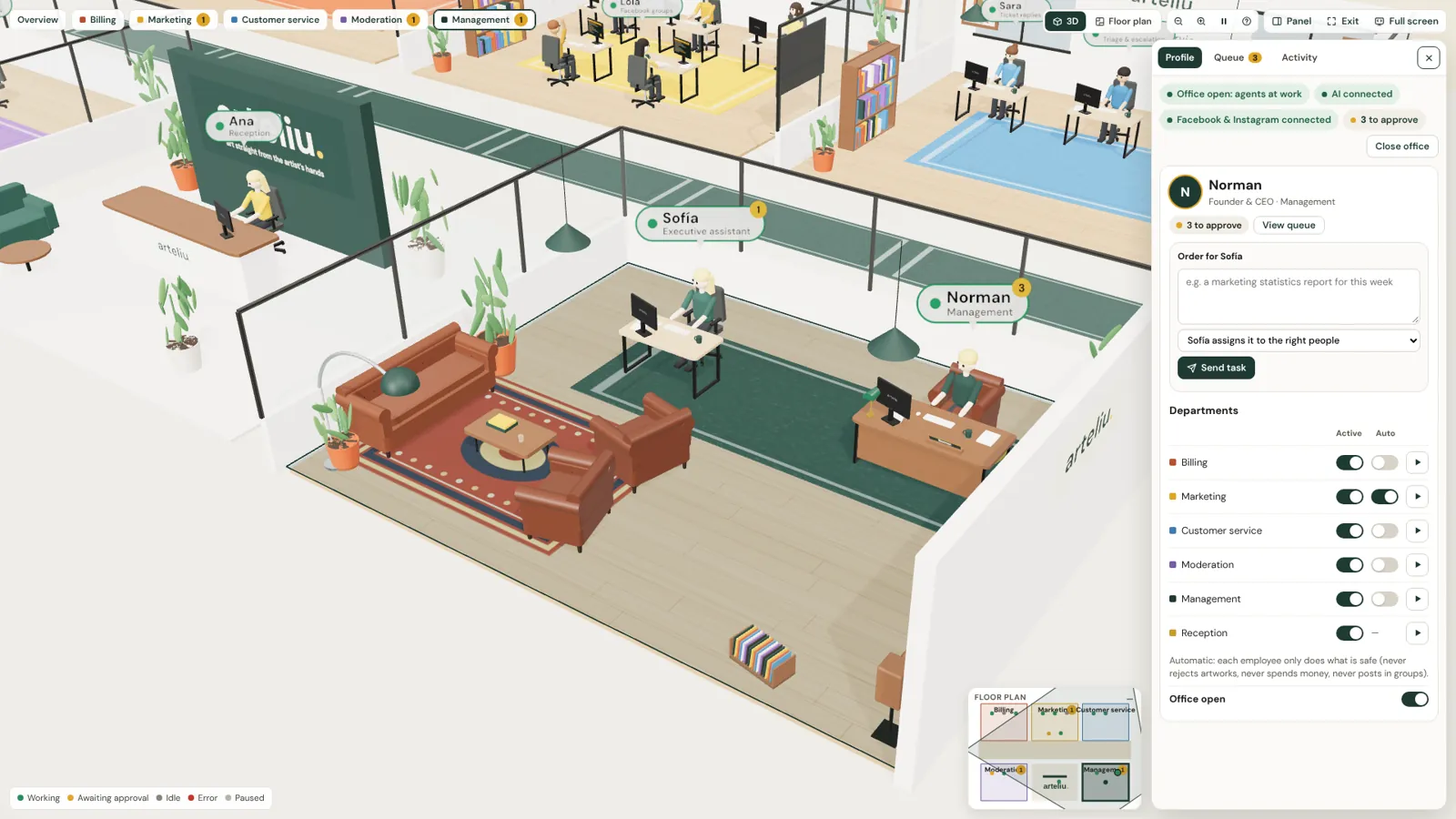
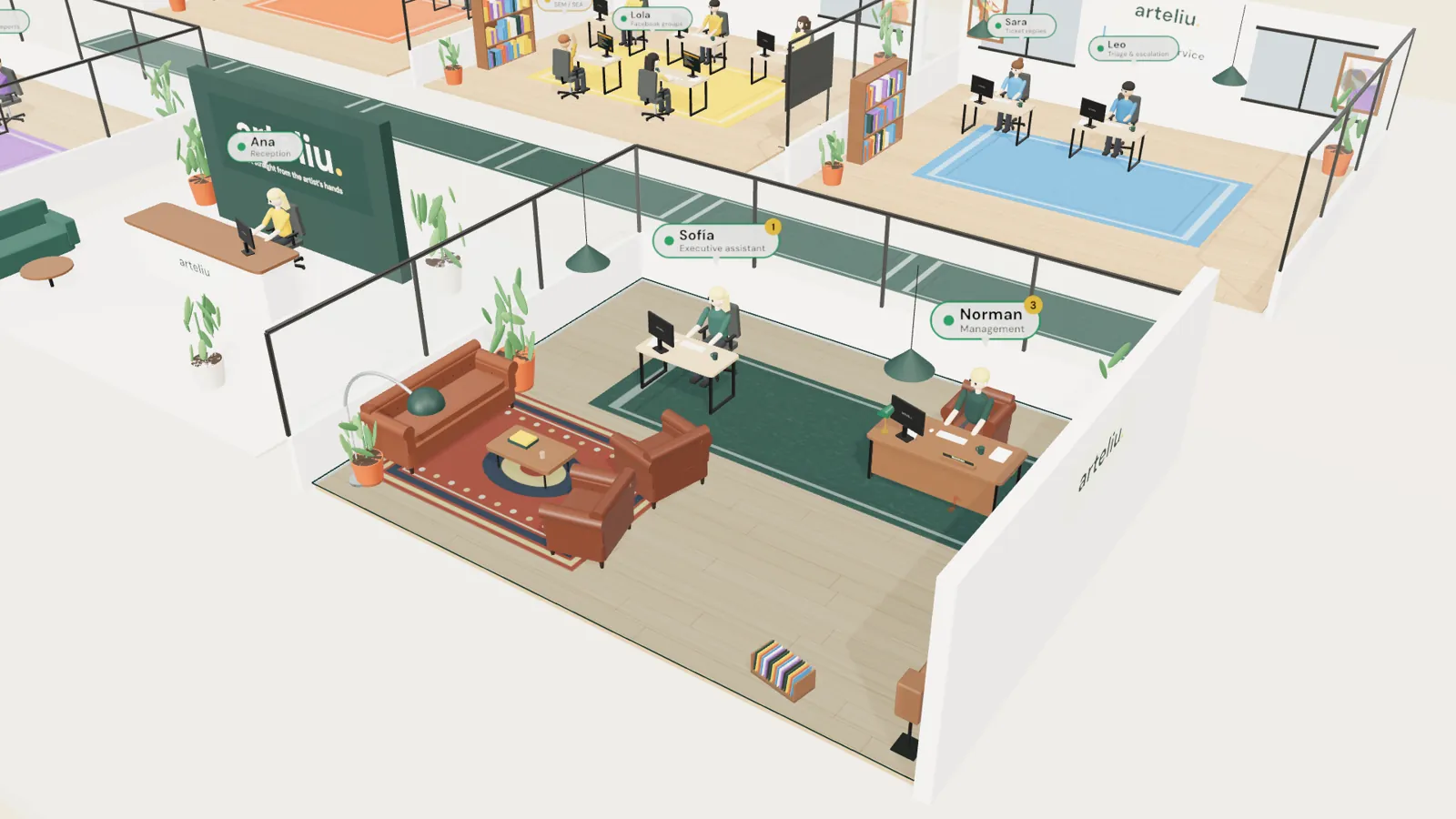
Management office: Norman at his desk, next to his assistant Sofía

YOUR ASSISTANT KNOWS THE WHOLE OFFICE.

Sofía takes your instructions, decides which employees handle them and hands you the finished result. Everything the departments send goes through her – including the sales report and the daily summary.

Manager panel: task for Sofía, departments with active and auto switches, three tasks to approve

YOU LEAD. THE OFFICE WORKS.

Everything you need as the boss, in one panel.

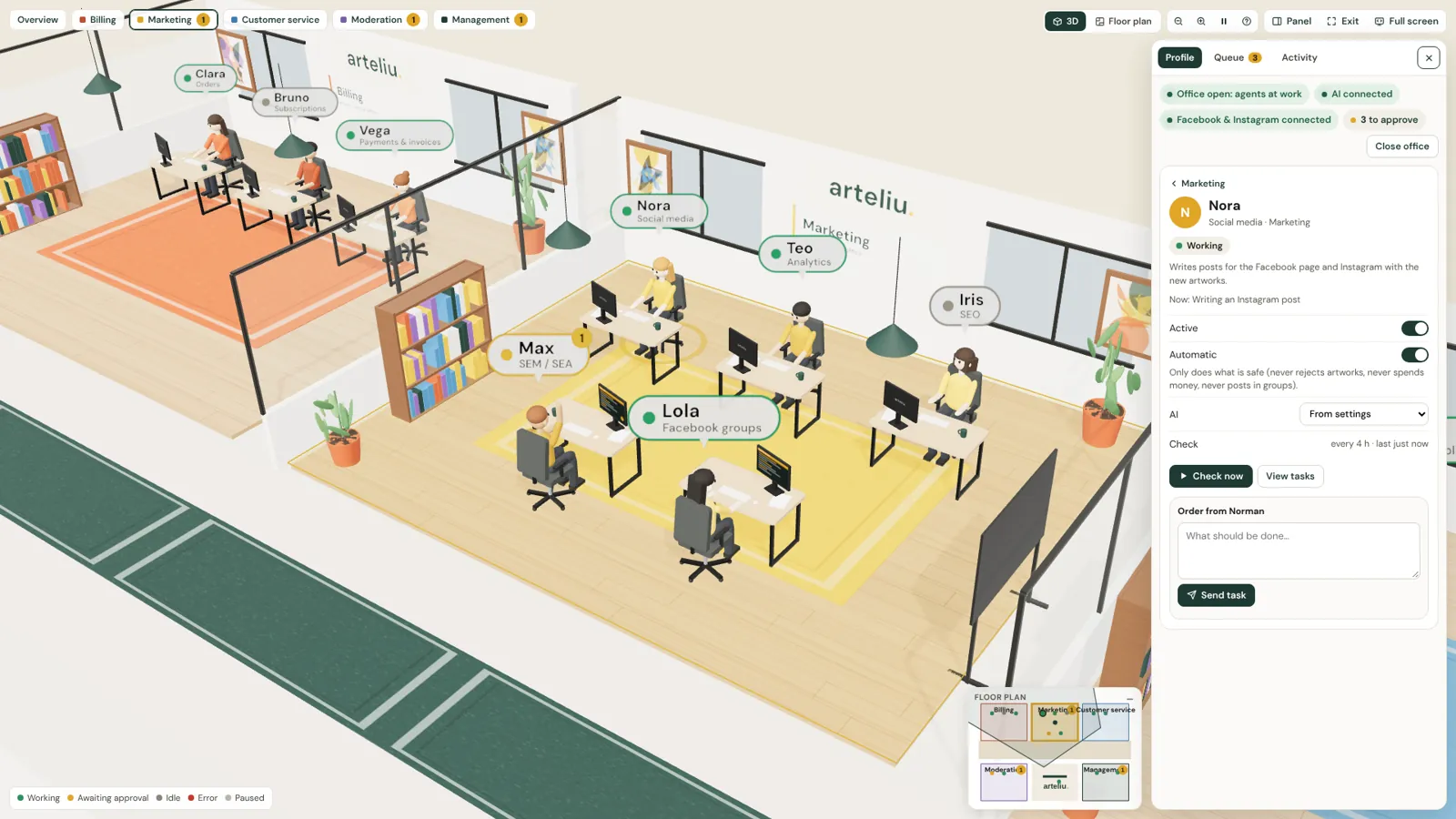
Nora from marketing selected: profile with her task, status, auto mode, chosen AI and a field to give her a task

ONE CLICK – AND YOU SEE IT ALL.

Click an employee to see what they do, what they're working on right now, their status, whether they run on auto and which AI they use. Right next to it: a field to give them a task.

YOUR TEAM AND THE AI. IN ONE OFFICE.

360º Virtual isn't only for AI employees. Your real staff get their own desk in the 3D office – with tasks, status and meetings in one place.

Real employees with task tracking

  • Their own desk – your staff sit in their department, right next to the AI employees.
  • Assign tasks – to a person or to the AI – you decide who takes what.
  • Everything in view – status and progress of every task, for team and AI, in the same view.

Virtual meetings in the meeting room

  • Meet in the 3D office – your team meets in the virtual meeting room, wherever everyone is.
  • Join directly – from inside the office, no extra software.
  • Live – in the office you see who is in the meeting.

NOTHING GOES OUT THAT YOU DON'T WANT.

Approval queue
Anything going out lands with you first. Every text can be edited before you approve it. Tasks always come back – with the result, or with the reason if something didn't work.
Auto mode – safe tasks only
Per employee or for a whole department – for example to publish straight to your Facebook page and Instagram. Auto mode never rejects content, never spends money and never posts in groups.
Game-style navigation
3D view or floor plan, minimap and full screen. One click selects a room, double-click takes you inside – with mouse, keyboard or on your phone.

NOT A TOY. YOUR OFFICE.

ARTELIU ALREADY WORKS THIS WAY.

Arteliu is our own marketplace for handmade art. Its office runs on 360º Virtual – every image and the video on this page come from there.

Visit arteliu.com

FREQUENTLY ASKED QUESTIONS

Is it safe? What goes out without my permission?
Nothing leaves your business without your approval – except tasks you deliberately leave on auto, such as posts on your Facebook page and Instagram. Auto mode never rejects content, never spends money and never posts in groups. Every text can be edited before you approve it.
Can real employees work in the office too?
Yes. Your staff get their own desk in the 3D office, next to the AI employees. You assign tasks to people or to the AI and see status and progress in the same view.
Can we hold meetings in the virtual office?
Yes. Your team meets virtually in the meeting room, straight from the office. In the 3D office you see who is in the meeting.
Which AI does it use?
You choose: for example Gemini or Llama via Groq – a different one for each employee if you like.
Does it adapt to my business and my departments?
Yes. We plan departments, employees and tasks around how you work. Your logo appears on the walls, reception and furniture.
How long does it take to set up?
Usually around two weeks – depending on how many departments and integrations your office needs.
Can it post in Facebook groups?
Yes, in assisted mode: the text is ready and you publish it with one click. Meta shut down the groups API in 2024, so it can't be fully automatic there.
Do I need to be technical?
No. You use the office like an app: click, read, approve. We take care of the setup and integrations.
LET US SHOW YOU
YOUR OFFICE IN 3D.

No package price: every office is planned individually – with your departments, your brand and your processes. In a short call we show you the demo and you get a quote that fits your business.

Or just ask Jarvis.